Free HMI Check
How well does your operator screenhold up in an upset?
Upload a screenshot of your HMI, control room display or machine software. You get a report with concrete findings and fixes, reviewed by hand, within 2 working days.
- Annotated screenshot with 10 to 15 findings
- Severity, reference and concrete fix for every finding
- Score for heuristics, accessibility, UX laws, ISO 9241-110 and industrial practice
- Free, one screen per company
In 3 steps
How it works
- 1
Upload a screenshot
One operator screen, ideally with two sentences of context: plant, operators, monitor and distance.
- 2
We review by hand
A UX designer with industrial experience reviews the image. If something is unclear, we ask by e-mail.
- 3
Report in 2 working days
You get the report as a PDF by e-mail. If you like, we walk you through it in 30 minutes.
Your screenshot sits in private storage, with no public link. We delete the screenshot after 90 days at the latest, or right after the report if you ask.
Your report
What you get
A PDF report, structured so your engineering team can work with it right away.
Annotated screenshot
Every finding as a number right on the image. You see at once where the problem is.
Severity
Critical, high, medium or low. So it is clear what goes into the next release.
Reference
Nielsen heuristic, WCAG criterion, ISO 9241-110 or ISA-101. Helps the discussion in your team.
Concrete fix
What to change, in colours, texts, sizes and spacing. Plus a score per area and a recommended order.
Sample report
What the report looks like
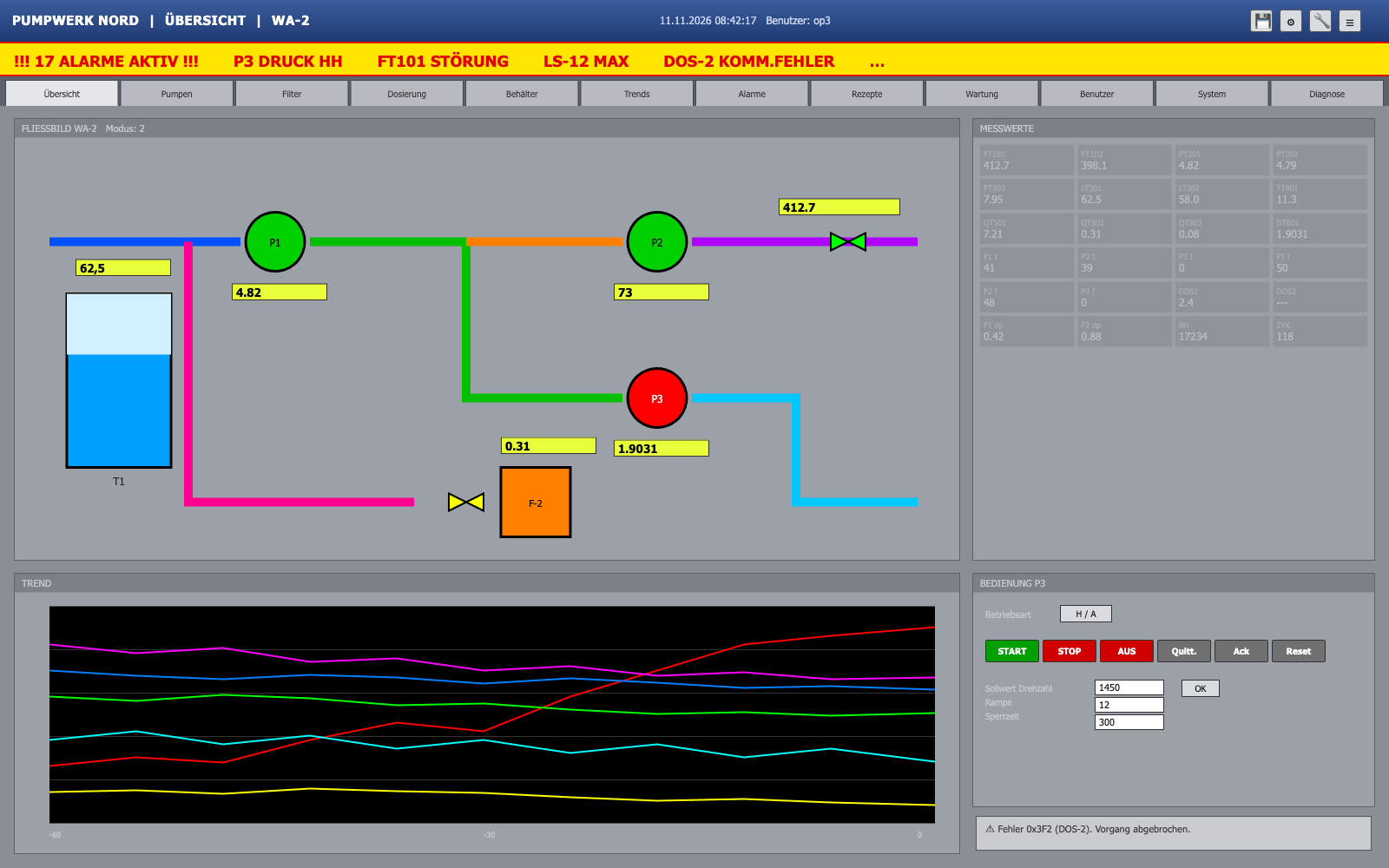
Excerpt from our sample report for a fictional pumping station: three of 15 findings and the score per area.
Pumping Station North, overview display WA-2
Fictional example. We built the screen, plant and values ourselves so you can see what you get. No client, no real plant.
Overall
40 / 100
- Nielsen's 10 heuristics
- 42
- Accessibility (WCAG 2.2 AA)
- 31
- UX laws
- 48
- ISO 9241-110 dialogue principles
- 45
- Industrial (ISA-101, gloves, distance)
- 34
9 of 10 heuristics with at least one finding
Contrast 1.35:1 to 1.6:1 on values, state shown by colour only
Fitts, Hick, Miller, Jakob, Gestalt
Weak on self-descriptiveness and error tolerance
Full colour in normal operation, small targets, values unreadable from 2 m
1 / 9
Findings map
Click a marker or pick a finding in the list. Arrow keys switch, Esc closes.
Alarm banner without priority
- Observation
- 17 alarms scroll by in red on yellow, all of equal rank. The first-out alarm (P3 pressure HH) and consequential alarms look the same. The banner flashes constantly, also for alarms already seen.
- Reference
- Nielsen #1 Visibility of system status · ISA-18.2 / EEMUA 191 (prioritisation, alarm floods) · ISA-101 (alarm display) · WCAG 2.2.2 (stop blinking)
- Fix
- Three priorities coded by colour, shape and number at once. Banner shows only the highest open alarm and the count per priority. Group or suppress consequential alarms. Flash only unacknowledged alarms.
Frameworks
What we review against
Five frameworks that work in industry. We use the standards as a reference for good practice, not as certification.
Nielsen's 10 heuristics
- Visibility of system status
- Error prevention and error messages
- Consistency and standards
- Recognition rather than recall
Accessibility per WCAG 2.2 AA
- Contrast of text and controls
- Target size of buttons
- Text size
- Signals not by colour alone
UX laws
- Fitts: size and distance of targets
- Hick: number of options
- Miller: grouping of values
- Jakob and Gestalt: expectation, proximity, similarity
ISO 9241-110
- Suitability for the task
- Self-descriptiveness
- Conformity with user expectations
- Error tolerance and controllability
Industrial practice
- ISA-101: greyscale, colour only for deviations
- Alarm display per ISA-18.2 and EEMUA 191
- Operation with gloves
- Reading from a distance
Trust
Who reviews
Thiago Andrade, founder of Beabstracto. Five years of industrial engineering at Siemens in steam turbine manufacturing, then UX for expert software, most recently modernising the legacy software of Ebner Industrieofenbau.
Siemens case: 80 to 90% less processing time per taskConfidential
- Your screenshot sits in private storage, with no public link.
- Only Beabstracto sees the image. We never show it or use it as a reference.
- For a first draft we may use the Claude API by Anthropic. A person reviews and sends every report.
- We delete the screenshot after 90 days at the latest, or right after the report if you ask.
- Need a non-disclosure agreement first? Write to contact@beabstracto.com.
Frequently asked questions
- What does the HMI Check cost?
- Nothing. We review one screen per company for free. Afterwards you decide whether you want more.
- What happens after the report?
- We offer you a 30-minute walkthrough. No newsletter. If you do not want a walkthrough, that is the end of it.
- Which screens fit?
- Machine HMI, control room, SCADA, MES, operator software and industrial dashboards. PNG, JPG or WebP up to 10 MB. A photo of the panel works too; a screenshot is better.
- Does this replace a usability test?
- No. The review finds known patterns quickly. How your operators react in an upset only shows in a test with them. We offer that if you want it.
- Why does it take 2 working days?
- Because a person reviews it. We measure contrast and convert sizes to your monitor and viewing distance.
- Several screens or whole workflows?
- The free check covers one image. For several screens, workflows or an old versus new comparison, we send you a quote.
One screenshot is enough to start.
Within 2 working days you get a report your team can work with right away. Free of charge.
Upload your screenshot now